Zero-Based Budgeting: Give Every Pound a Job
Plan every pound of take-home pay before the month starts, until what is left to assign is exactly £0 — with a worked UK example and a Google Sheets template.
Templates for this
- Advanced Monthly Budget Planner — £5.00
Zero-based budgeting means you plan every pound of your take-home pay before the month starts, until income minus everything you have assigned equals exactly £0. Nothing is left "spare". Bills, food, debt repayments, savings and a small buffer all get a named amount, so the question at the end of the month is no longer "where did it go?" but "did it go where I told it to?"
It is not about spending less. It is about deciding in advance. A £0 balance does not mean an empty account — the money assigned to savings is still yours. It means no pound is left unaccounted for.
What is zero-based budgeting, in one line?
Income − (bills + spending + debt repayments + savings) = £0. You repeat that sum every month, starting from zero rather than copying last month's numbers, because every month is different — five Fridays, a birthday, an annual renewal, a council tax holiday.
The name comes from business accounting, where departments justify every cost from scratch each year instead of rolling last year's budget forward. At home it means the same thing: each amount is a decision, not a habit.
How does zero-based budgeting work in the UK?
It works from take-home pay — the amount that actually lands in your account after income tax, National Insurance, pension and student loan deductions. Budgeting from your gross salary is the most common reason a first budget fails, because the money it plans was never yours to spend.
A few UK specifics make zero-based budgeting more useful than it sounds:
- Council tax is usually paid in 10 instalments, leaving February and March free. In a zero-based budget those two months get their £145 reassigned on purpose — to savings or debt — instead of quietly disappearing.
- Annual costs arrive in lumps: car insurance, the MOT, the TV licence, Christmas. Zero-based budgeting turns them into monthly amounts called sinking funds, so the bill is already paid for when it lands.
- Monthly pay with a 4- or 5-week gap is common. Budgeting payday to payday, rather than calendar month, keeps the plan matched to the money you actually have.
A worked example: £2,400 take-home, assigned to £0
Here is a realistic single-person budget on £2,400 a month take-home. Every pound is assigned.
| Group | Category | Amount |
|---|---|---|
| Bills | Rent | £950 |
| Council tax | £145 | |
| Energy (gas & electricity) | £110 | |
| Water | £35 | |
| Broadband & mobile | £55 | |
| Subscriptions | £25 | |
| Spending | Groceries | £300 |
| Transport | £140 | |
| Eating out | £80 | |
| Personal & clothes | £60 | |
| Buffer | £50 | |
| Debt | Credit card | £150 |
| Savings | Emergency fund | £150 |
| Christmas sinking fund | £50 | |
| Car & MOT sinking fund | £50 | |
| Holiday | £50 | |
| Total assigned | £2,400 | |
| Left to assign | £0 |
Bills £1,320 + spending £630 + debt £150 + savings £300 = £2,400. Income minus the plan is zero.
How to set up a zero-based budget, step by step
- Start with this month's take-home pay. Use the real figure from your payslip, not your salary. If income varies, use the lowest recent month.
- List every bill with a fixed date — rent or mortgage, council tax, energy, water, phone, subscriptions, insurance.
- Set limits for everyday spending: groceries, transport, eating out, personal. Base them on what you actually spent last month, then decide whether that is what you want to spend.
- Give debt its own line. At least the minimum payment on each debt; anything extra you choose to put towards it — the snowball or avalanche method decides which debt gets it.
- Assign savings last, but assign them. Emergency fund first, then sinking funds for known annual costs, then goals.
- Check the total. If assigned is higher than income, cut until it is not. If it is lower, the difference is not "spare" — give it a job, usually savings or debt.
- Log what you spend through the month, and compare it with the plan each week.
- When a category runs over, move money from another one. That is the point of the method: overspending on food means deciding what it comes out of, not quietly going into the overdraft.
Doing it in Google Sheets
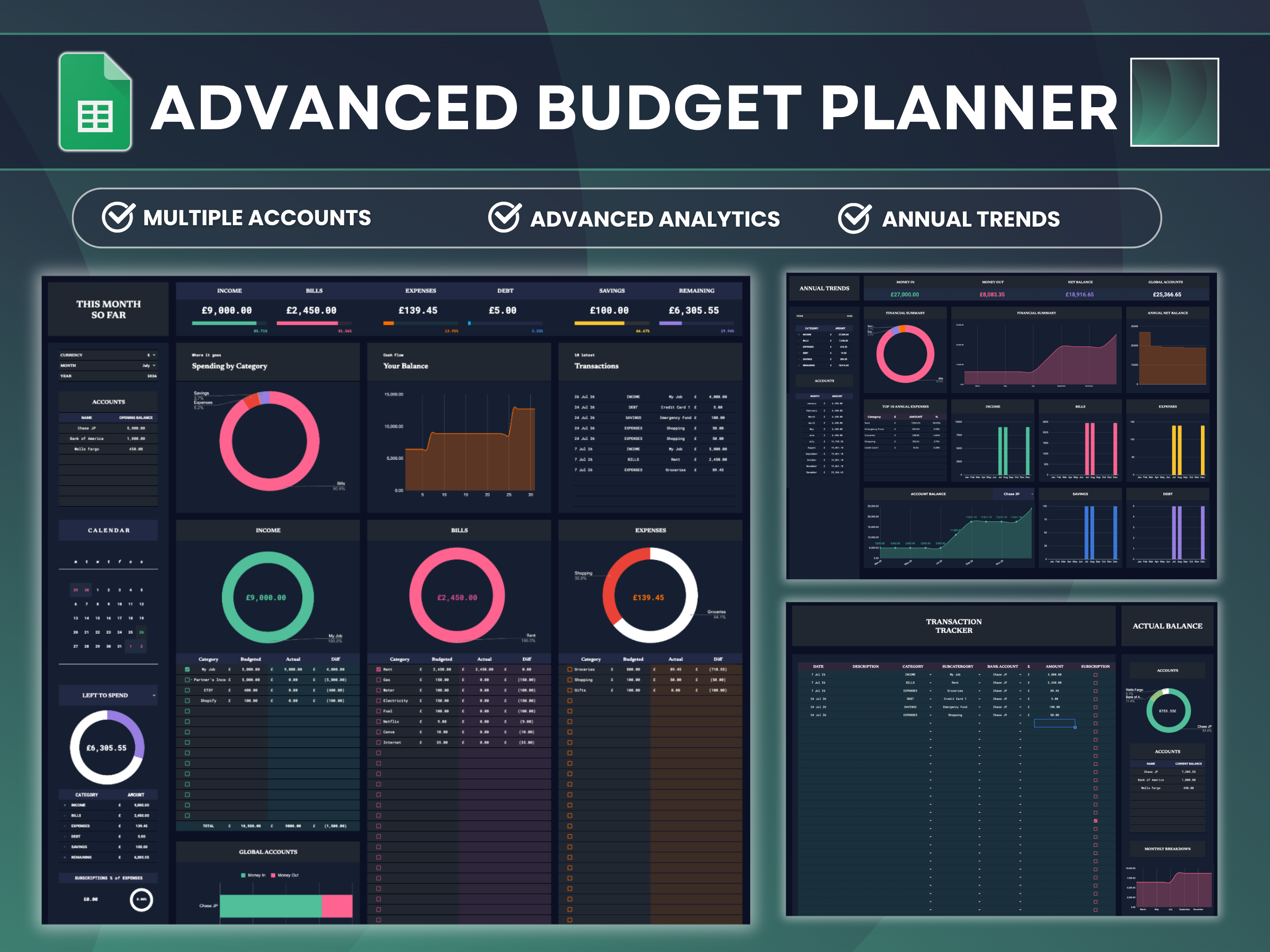
You can do all of this with a pen, but a spreadsheet does the adding up and the comparison for you. The Advanced Monthly Budget Template for Google Sheets is laid out in the same five groups used above — income, bills, expenses, debt and savings — with a budgeted, actual and difference column for every category.
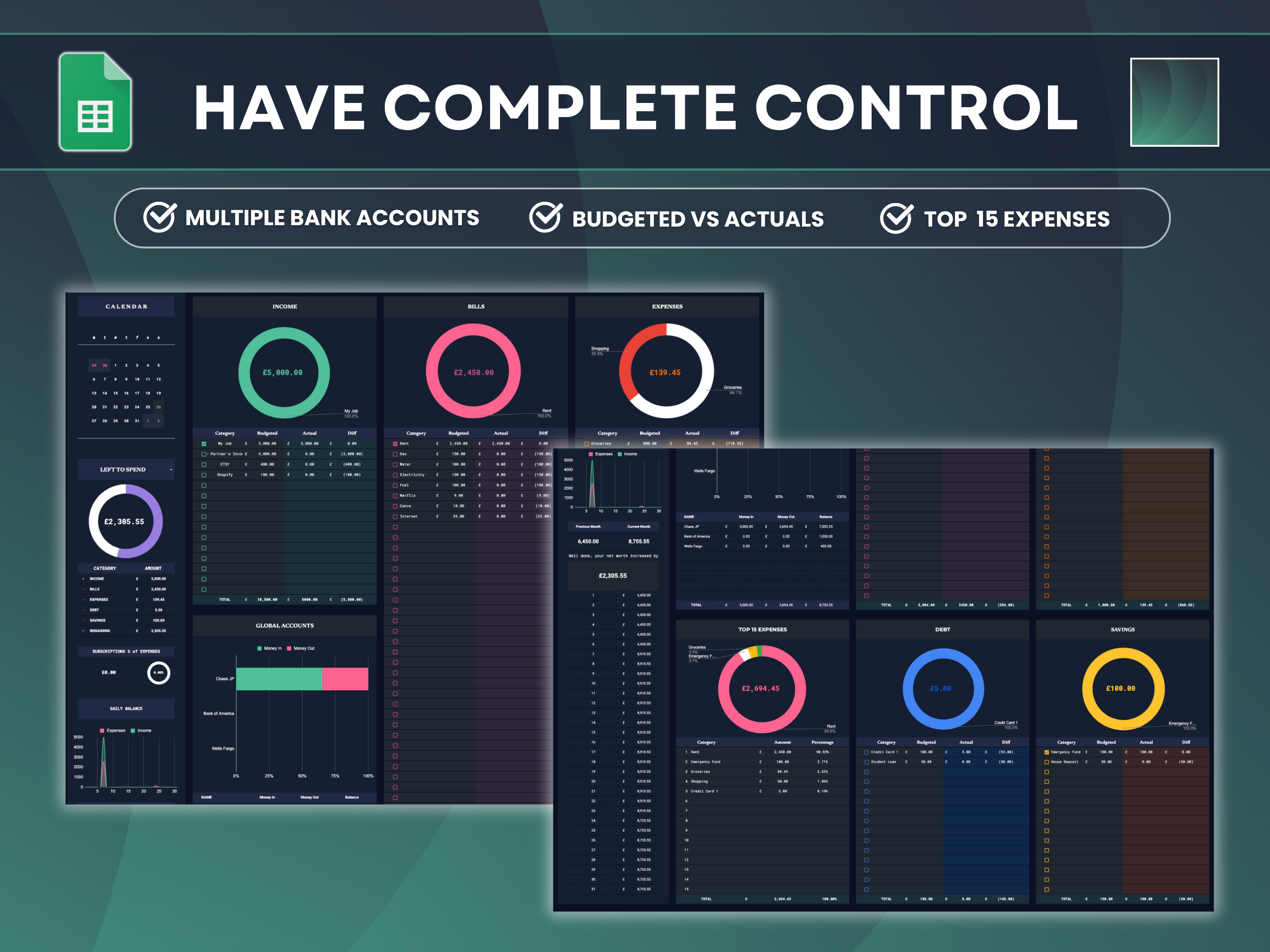
This is how the method maps onto the template:
- Steps 1–5 — make the plan. Pick your currency, month and year, add your bank accounts with their opening balances, and type a budgeted amount against each category. Categories and subcategories are editable, so the example above can be copied line for line.
- Step 6 — check it adds up. The dashboard totals income, bills, expenses, debt and savings, and shows what remains. In a zero-based plan, the budgeted amounts add up to your income.
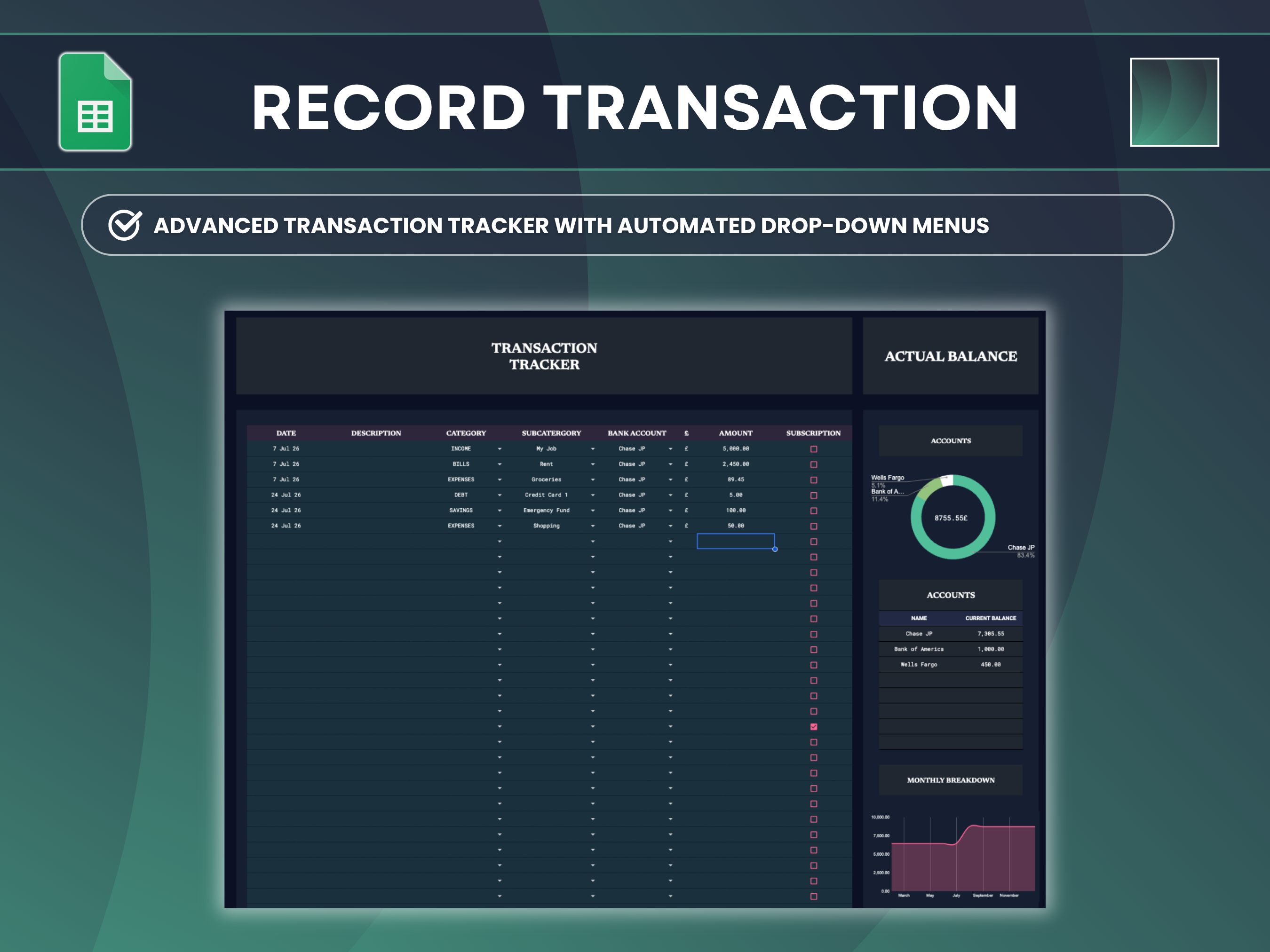
- Step 7 — log spending. Each transaction is one row: date, description, then category, subcategory and bank account picked from drop-down menus. A tick box marks subscriptions, and the dashboard shows what share of your spending they make up.
- Step 8 — rebalance. The difference column shows which categories are over or under, and the left to spend dial shows what is still available this month.
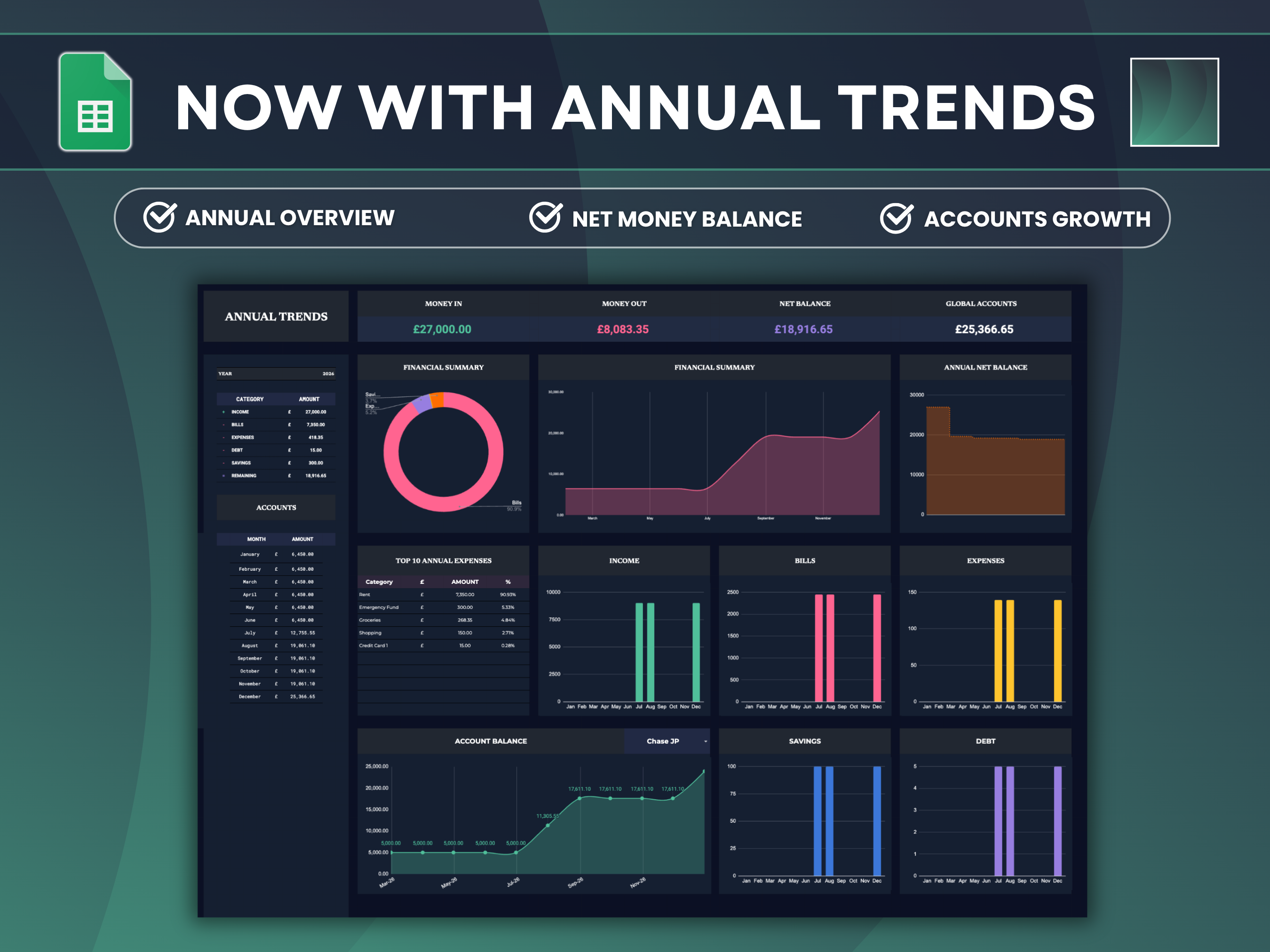
At the end of the month the dashboard compares your net worth with the previous month, and the annual view shows money in, money out, your top 10 expenses of the year and how each account's balance has moved — the long view that shows whether a year of zero-based budgets is actually working.
The download includes a blank copy for your numbers, an example copy already filled in, a YouTube walkthrough and written instructions. It is a one-off £5 purchase with no subscription, and the file lives in your own Google Drive.
Zero-based vs 50/30/20 vs envelope budgeting
| Zero-based | 50/30/20 | Envelope | |
|---|---|---|---|
| How it works | Every pound assigned until £0 is left | Income split into needs 50%, wants 30%, savings and debt 20% | Cash (or digital "pots") per category; when a pot is empty, spending stops |
| Effort | Highest — planned monthly | Lowest — three numbers | Medium |
| Best for | Tight months, paying off debt, irregular costs | A first budget, stable income | Overspending on one or two categories |
| Weak spot | Takes 20–30 minutes a month | 50% for needs is unrealistic with high rent | Awkward for bills paid by direct debit |
They are not rivals. Many people start with 50/30/20 to find their rough shape, then move to zero-based once they want every pound accounted for. Monzo, Starling and similar banks' savings pots work well as envelopes inside a zero-based plan.
Common mistakes
- Budgeting from gross salary instead of take-home pay.
- Forgetting annual and irregular costs. If the MOT or Christmas does not have a monthly amount, it will arrive as an emergency.
- No buffer. A plan with no room for the unexpected gets abandoned the first time something unexpected happens.
- Treating £0 as "nothing left for me". Savings and fun money are assigned too; £0 means planned, not spent.
- Copying last month without checking. Five-Friday months, birthdays and renewals change the numbers.
- Giving up after one bad month. Overspending is information: it tells you which limit was unrealistic.
Frequently asked questions
Is zero-based budgeting good for beginners?
Yes, if you are willing to spend about 30 minutes setting it up. It is more detailed than the 50/30/20 rule but easier to stick to, because every category has a clear limit and you can see exactly where you went over.
Does zero-based budgeting mean I spend all my money?
No. "Zero" means every pound has been assigned, not spent. Money assigned to savings, sinking funds or extra debt repayments is still yours — it just has a purpose.
What if my income changes every month?
Budget from your lowest typical month, or wait until the money has arrived and budget last month's income. Any month you earn more, assign the extra deliberately — usually to savings or debt.
How long does a zero-based budget take each month?
About 20 to 30 minutes to plan at the start of the month, plus a few minutes a week to log spending and check the difference column. With a template, most of the time goes on deciding, not adding up.
Can I do zero-based budgeting in Google Sheets?
Yes. You need a list of categories with a budgeted and an actual amount for each, a place to log transactions, and a total that shows what is left to assign. The Advanced Monthly Budget Template is built that way, with drop-down menus for logging and a dashboard that updates as you go.
Is a spreadsheet better than a budgeting app?
It depends on what you want. Apps can connect to your bank and categorise automatically, but most charge a subscription and your data lives on their servers. A spreadsheet costs nothing to keep using, shows every formula, and stays in your own Drive — at the cost of logging transactions yourself.
What is the difference between zero-based budgeting and the envelope method?
Zero-based budgeting is the plan: every pound gets a job. The envelope method is one way to enforce it: each category's money is kept separate, and when an envelope is empty, spending in that category stops.